


IFRS 16-system bygget på din egen Microsoft 365
ShareControl IFRS 16 automates lease accounting under IFRS 16 — right-of-use asset, lease liability, depreciation, interest expense, and notes — without moving data out of your Microsoft 365 environment.
Local GAAP
GDPR & DORA compliance
Data in EU/Norway
AES-256 encryption
In Short: ShareControl IFRS 16 is an IFRS 16 solution that lives directly within the company’s existing Microsoft 365 tenant. The solution is installed as a SharePoint add-on on the customer’s own Microsoft 365 platform and handles the entire lifecycle of a lease — from identification and classification, through calculation of the right-of-use asset and lease liability, to audit-ready reporting and notes to the annual accounts. All data remains in the customer’s own tenant, and the solution fully inherits Microsoft 365’s security, access, and logging regime. This means no external SaaS storage and no new data processing agreement beyond the one the customer already has with Microsoft.
BENEFITS
Here’s how ShareControl IFRS 16 delivers concrete benefits
IFRS 16 places strict demands on consistency, traceability, and remeasurement — demands that become difficult to meet in spreadsheets as the number of leases grows. Each benefit below addresses a concrete challenge in the finance department’s IFRS 16 work and how ShareControl IFRS 16 solves it.
OPERATIONAL BENEFIT
Full control over what counts as a lease
Challenge: With leases spread across departments, local offices, and supplier portals, identification and classification become a manual review that must be repeated every time new contracts are entered into.
Solution: A central archive in SharePoint with standardized assessment templates and guided classification (in-scope, short-term, low-value) — so you avoid scattered documentation, inconsistent assessments across companies, and a lack of overview of what has actually been recognized.
FINANCIAL BENEFIT
Correct recognition from day one
Challenge: For every new lease, the discount rate, lease term, and present value must be set manually, and the initial entries set up in Excel — with the risk of errors that propagate throughout the entire lease term.
Solution: Standardized input fields with a built-in calculation engine for present value, right-of-use asset, and lease liability — so you avoid inconsistent assumptions, errors in opening entries, and calculation discrepancies that are only discovered later.
FINANCIAL BENEFIT
Quarter-end close without manual reconciliations
Challenge: With 50+ lease agreements, monthly depreciation, interest and payment allocation becomes a recurring manual exercise that ties up resources in the finance department and must be repeated every period.
Solution: Automatic period allocation via ShareControl’s calculation engine, with ready-made journal entries prepared for the general ledger — so you avoid manual monthly calculations, duplicated work against the ERP and lengthy quarter-end reconciliations.
FINANCIAL BENEFIT
Changes handled correctly every time
Challenge: Index adjustments, option exercises, renegotiations and modifications each require different accounting treatment — in Excel this produces accumulated errors that only surface at the quarterly reconciliation or during audit.
Solution: Change-driven remeasurement that separates reassessments from modifications and generates correct journal entries automatically — so you avoid misclassification, retrospective corrections and inconsistent treatment across lease agreements.
GROUP BENEFIT
Consolidated accounts without manual mapping
Challenge: I In groups with multiple currencies and different posting logic per subsidiary, consolidation requires manual translation, mapping and reconciliation every period — with the risk of discrepancies that only get closed at year-end.
Solution: A shared data model across companies and automatic currency translation via bank API for exchange rates — so you avoid inconsistent classification across subsidiaries, manual FX handling and discrepancies between company and group.
COMPLIANCE BENEFIT
Correct errors without reopening a locked accounting period
Challenge: When a change or correction to a lease agreement relates to a period that is already locked, the accounting department must choose between reopening the locked period or making an imprecise adjustment in the open period — both options have consequences for audit and control.
Solution: The Accounting Date feature in ShareControl IFRS 16 lets you make correct changes from the date they actually occur, calculate the accumulated effect correctly, and post the result in the open period — so you avoid reopening locked periods, manual corrections and discrepancies between IFRS 16 data and the general ledger.
REPORTING BENEFIT
Notes and maturity analysis ready for the annual accounts
Challenge: At quarter-end and year-end, the maturity analysis, disclosure tables and qualitative note disclosures must be assembled from multiple sources, often under a tight deadline and with high demands for consistency.
Solution: Built-in templates for IFRS 16 notes, an automatically generated maturity analysis and disclosure tables drawn directly from the lease data — so you avoid manual assembly, formatting errors and discrepancies between notes and accounts.
AUDIT BENEFIT
Audit-ready documentation at all times
Challenge: Across multiple periods, change history, judgements and calculation bases must be reconstructable on the auditor’s request — often from scattered emails, versioned spreadsheets and personal notes.
Solution: A complete audit trail in SharePoint with a version log on all changes and traceability from note figures back to the source document — so you avoid reconstructing history under time pressure, conflicting versions and unresolved audit findings.
CUSTOMERS
Companies that use ShareControl IFRS 16
A selection of the customers that have chosen ShareControl IFRS 16 for their IFRS reporting. What the portfolio has in common is that it covers both listed groups and large private enterprises, with lease agreements in multiple currencies and jurisdictions.






THE LEASING PROCESS
How ShareControl IFRS 16 supports the lease workflow
The IFRS 16 process follows a recognizable lifecycle for each lease agreement, from identification at contract inception to note disclosures at year-end. ShareControl IFRS 16 is built around this lifecycle in five steps, so that the CFO, group accounting manager, accounting manager, finance team and controller recognize their own work and see exactly where the system takes over manual tasks.
1
Registration and classification of new lease agreements
2
Interest rate determination, contract changes and revised judgements
3
Internal controls, adjustments and automatic calculations
4
Consolidation, reconciliation and presentation in the accounts
5
Analysis, reports and note disclosures
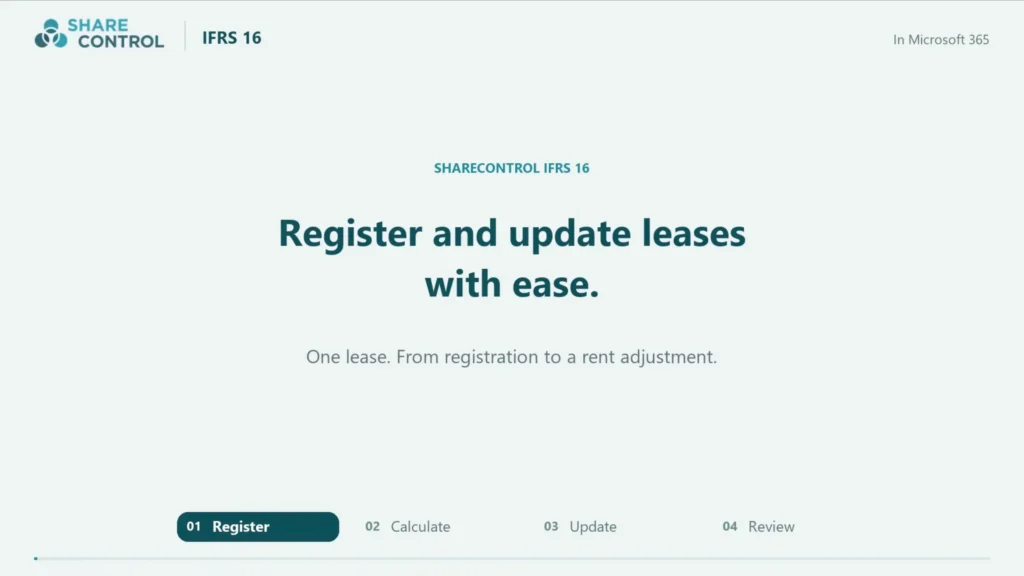
Step 1
Registration and classification of new lease agreements
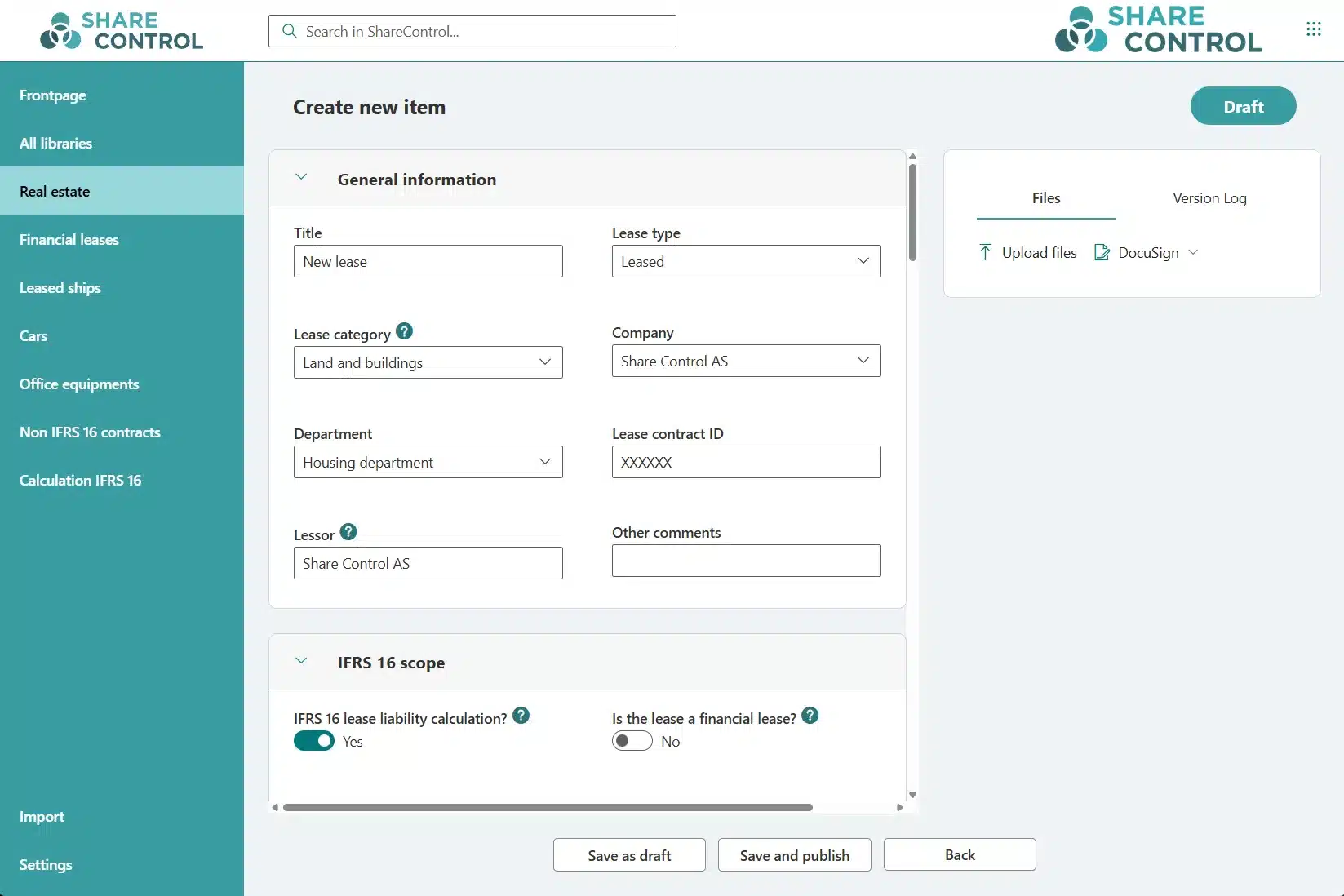
The first step in the IFRS 16 process is to assess whether a contract contains a lease, and then to classify it according to the standard’s criteria for an “identified asset” and the “right to control the use.” The classification determines whether the agreement is recognized on the balance sheet or treated as an exemption — short-term (under 12 months) or low-value.
WHAT SHARECONTROL IFRS 16 HANDLES
- Identification of leases against the IFRS 16 criteria
- Classification as in-scope, short-term or low-value
- Central archive in SharePoint with standardized assessment templates
- Import of an existing lease portfolio from Excel and other systems
- Regular import based on reports from leasing companies, for example vehicle fleet leasing
- Lookup against the Brønnøysund Register Centre for automatic retrieval of the counterparty’s company data (organization number, name and address)
- Auto-ID — an automatically generated unique agreement ID for each lease, traceable through the entire lifecycle
- Guided form for registering new agreements
- Documented basis of judgement on each individual agreement
- Searchable and filterable portfolio across companies
THE IMPACT
Time savings: up to 70% reduction in onboarding time compared with manual registration
Consistency: the same data fields and classification rules across all lease agreements
Traceability: the basis of judgement for in-scope, short-term and low-value is documented on the lease
Overview: one central lease portfolio, not spreadsheets scattered across departments
Step 2
Interest rate determination, contract changes and revised judgements
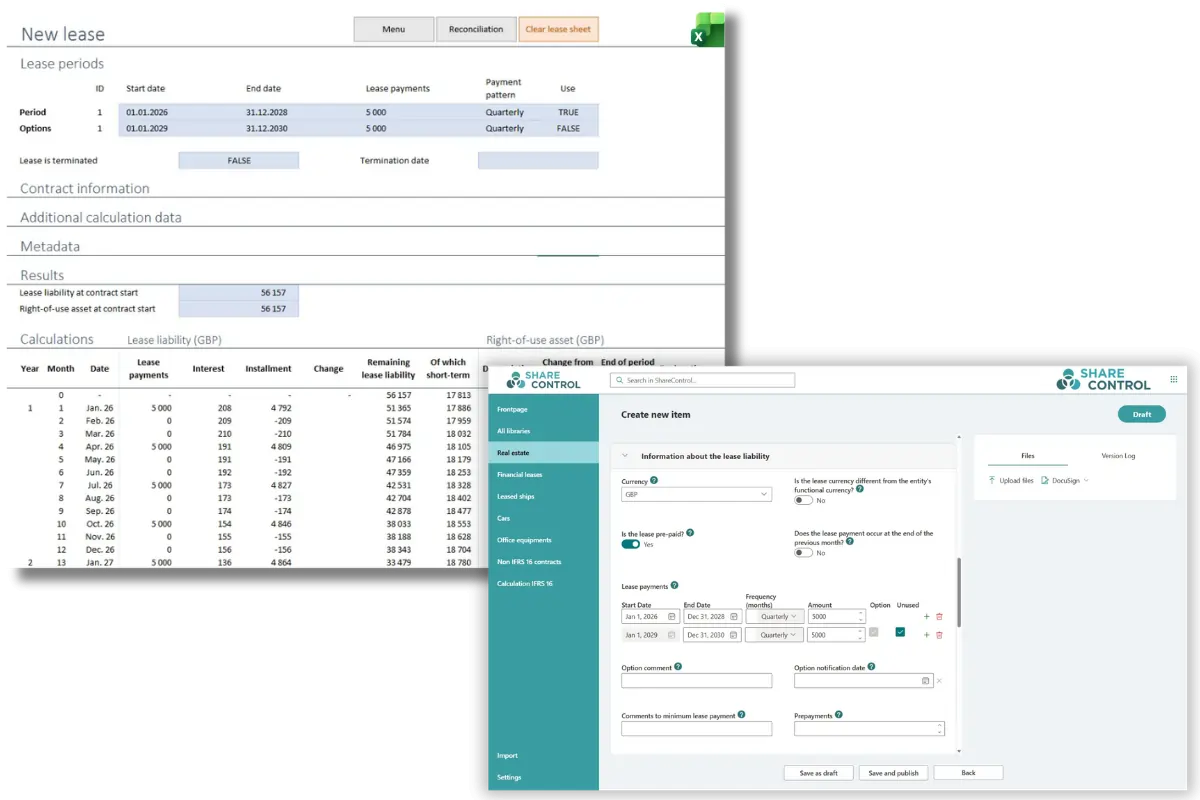
At lease commencement, the lease liability and the right-of-use asset must be measured and recognized. The lease liability is calculated as the present value of future lease payments, discounted using the interest rate implicit in the lease or the lessee’s incremental borrowing rate. The assumptions must be documented so they are traceable on audit.
WHAT SHARECONTROL IFRS 16 HANDLES
- Calculation of the lease liability based on the payment schedule, discount rate and term
- Calculation of the right-of-use asset including direct costs and prepayments
- Handling of the discount rate — implicit rate or incremental borrowing rate, per agreement or per portfolio
- Fixed and variable lease payments
- Opening journal entries generated automatically
- Entries delivered as a bookkeeping journal (standard) or directly to the ERP via integration (add-on)
- Documented assumptions on each lease agreement
THE IMPACT
Consistent assumptions: discount rate and lease term documented per agreement
Correct opening entries: lease liability and right-of-use asset calculated to the IFRS 16 requirements
Flexible ERP delivery: bookkeeping journal as standard, direct integration as an add-on
Traceability: all input fields and assumptions documented on the lease
Step 3
Internal controls, adjustments and automatic calculations
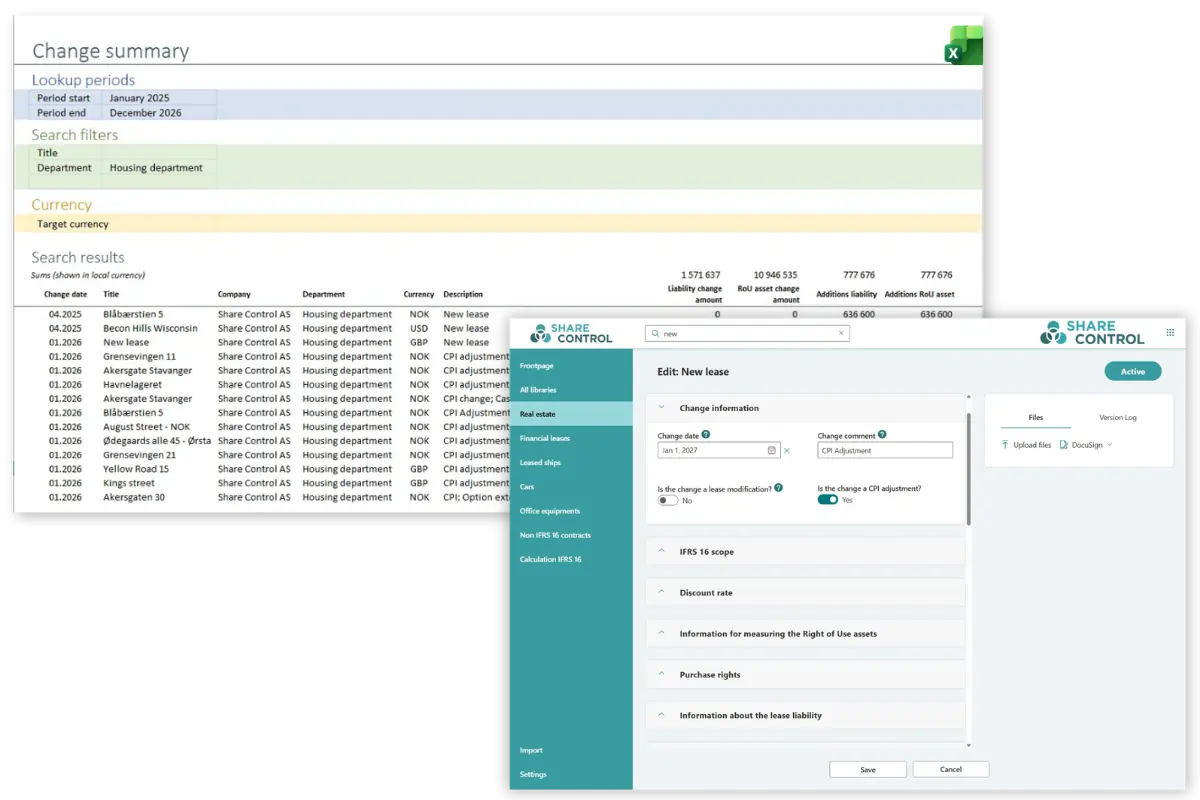
After recognition, each lease must be allocated to periods monthly and remeasured when changes occur. IFRS 16 distinguishes between reassessments (changes to the original contract) and modifications (renegotiations — lease modifications), which have different accounting treatment. For groups with multiple currencies, ongoing currency translation to the reporting currency is required.
WHAT SHARECONTROL IFRS 16 HANDLES
- Period allocation of depreciation, interest and payment allocation per month
- Amortization of right-of-use assets using the straight-line method
- Lease modifications — renegotiations, extensions, terminations and scope changes
- Reassessment — option exercises, changes in lease term and variable payments
- Index adjustment of lease payments and the lease liability
- Full currency handling — the lease liability is remeasured on an ongoing basis at the prevailing exchange rate, while the right-of-use asset is kept at the original rate on the transaction date (IFRS 16 §8.2)
- Average exchange rates for income statement items, balance sheet date rate for balance sheet items
- Multi-currency translation via bank API against Norges Bank or the group’s own exchange rates
- Daily exchange rates available for shipping, oil & gas, offshore and large industrial, construction and manufacturing leases
- Change entries delivered as a bookkeeping journal or directly to the ERP via integration
THE IMPACT
Period allocation: depreciation, interest and payment allocation automatically per month
Reassessments: index adjustment and option exercises generate correct remeasurement
Modifications: renegotiations treated to the IFRS 16 requirements with a complete change entry
Multi-currency: IFRS 16-correct asymmetric treatment of the lease liability and right-of-use asset, with automatic rate updates via the Norges Bank integration or the group’s own exchange rates
Step 4
Consolidation, reconciliation and presentation in the accounts
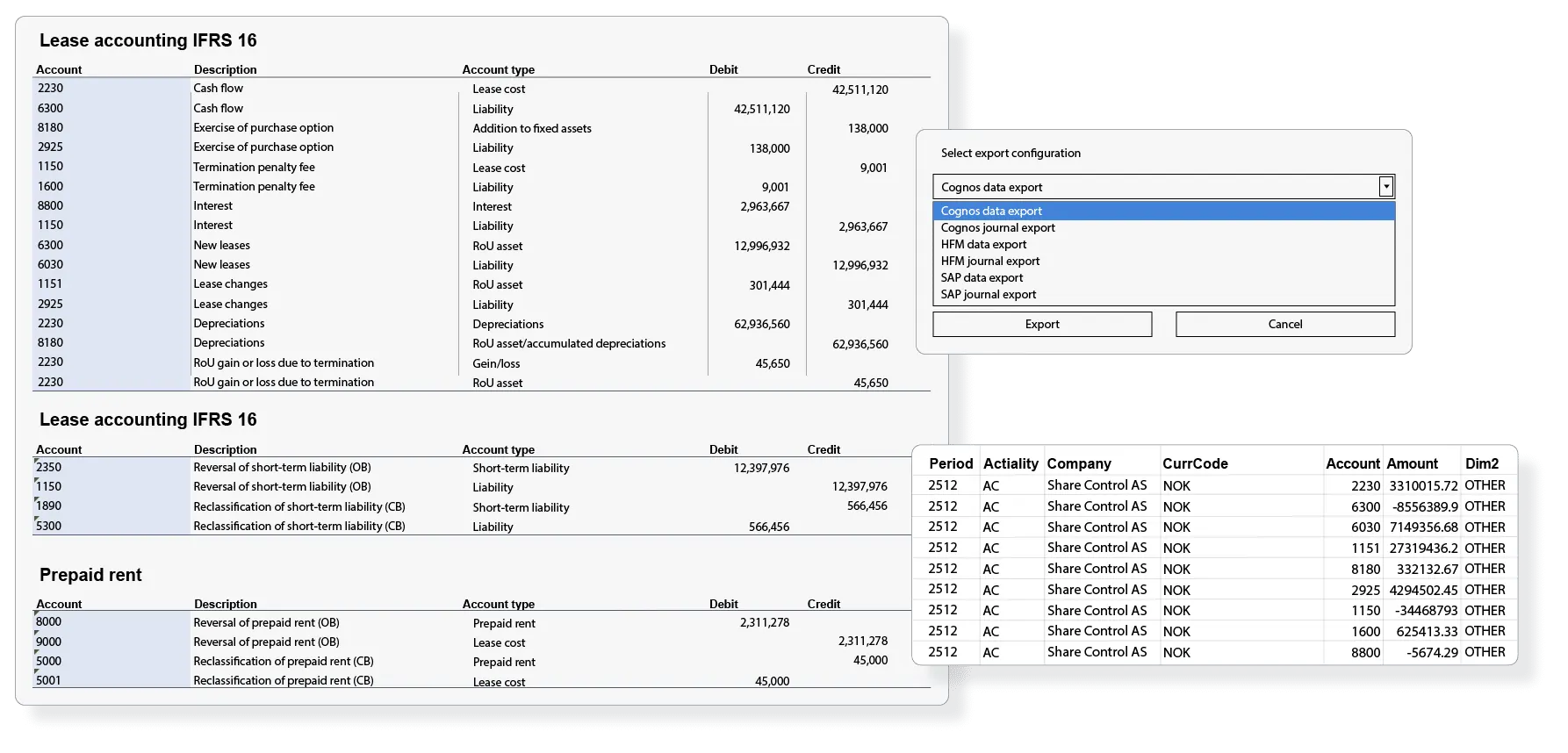
IFRS 16 requires right-of-use assets and lease liabilities to be presented in the correct place in the balance sheet, depreciation and interest expense to be recognized in the income statement, and cash flows to be allocated correctly between operating, investing and financing activities. For groups, the presentation must be consistent across subsidiaries.
WHAT SHARECONTROL IFRS 16 HANDLES
- Balance sheet recognition of right-of-use assets and lease liabilities
- Automatic classification of lease liabilities as current vs. non-current
- Income statement recognition of depreciation and interest expense
- Cash flow elements allocated to the IFRS 16 requirements
- Reconciliation against the general ledger per period
- Group presentation on a shared data model and posting logic
- Filterable reports per company, category or cost center
THE IMPACT
Reconciled against the general ledger: right-of-use asset and lease liability match the ERP at all times
Correct classification: current and non-current lease liabilities allocated automatically
Group consistency: shared data model and posting logic across companies
Filterable reports: per company, category or cost center
Step 5
Analysis, reports and note disclosures
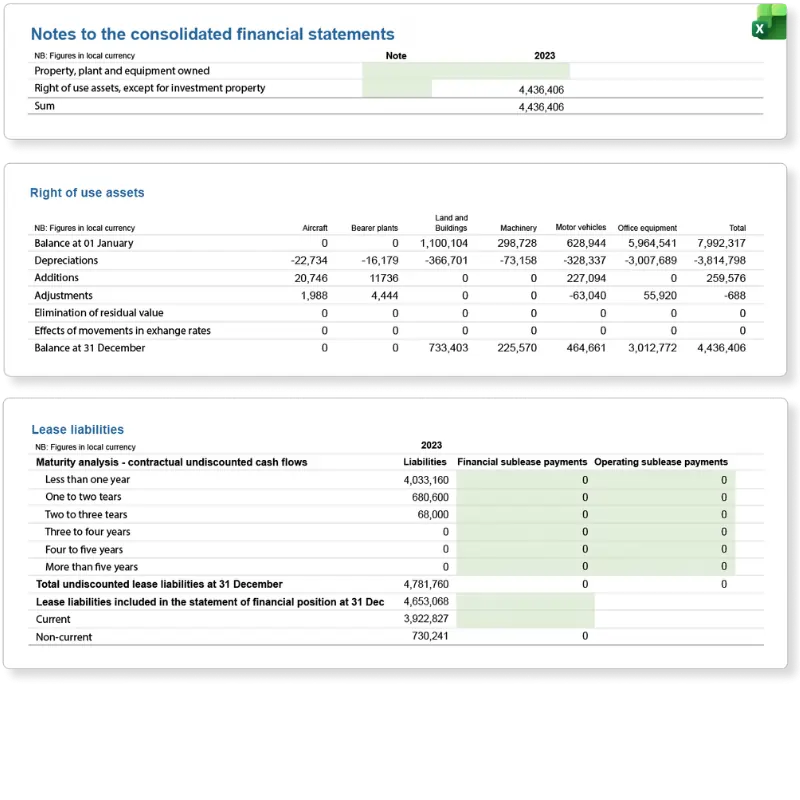
IFRS 16 sets extensive disclosure requirements: a maturity analysis of lease liabilities, disclosure tables per category of right-of-use asset, qualitative information on accounting policies and judgements, and information on variable lease payments and short-term leases. The Fixed Asset Note and forecasting function are available as add-ons in ShareControl IFRS 16 PRO — see the separate section below.
WHAT SHARECONTROL IFRS 16 HANDLES
- Maturity analysis for the entire lease portfolio
- Disclosure tables per category of right-of-use asset (property, vehicles, IT equipment, etc.)
- Qualitative note disclosures on policies and judgements
- Lease liabilities — current and non-current maturities
- Depreciation and interest expense per category
- Variable lease payments and short-term leases documented
- Export to Excel, Power BI or directly to a consolidation system (Oracle HFM, IBM Cognos Controller)
THE IMPACT
Maturity analysis: automatically generated for the entire portfolio
Disclosure tables: per category of right-of-use asset to IFRS 16
Qualitative notes: templates that document policies and judgements
Flexible output: Excel, Power BI or directly to a consolidation system
Across the entire IFRS 16 process — audit trail and documentation
From the first identification to the note text in the annual accounts, ShareControl IFRS 16 maintains a complete audit trail: a version log on all changes, traceability from note figures back to the source document, and a documented basis for decisions on each individual lease. An auditor who asks how a specific note came to be can follow the trail without reconstructing the work from emails or versioned spreadsheets.
More about audit trail and documentation in ShareControl IFRS 16
PRO ADD-ON
Extended functionality for complex reporting needs
ShareControl IFRS 16 PRO is an add-on that builds on the standard solution and adds functions for finance departments with extended needs for note disclosures and forward-looking analysis of the lease portfolio.
PRO
Fixed Asset Note
A detailed note overview of the company’s non-current assets — including values, changes in the period, and leases linked to each individual asset. Provides a complete picture of the asset base and leases in a single document, ready for the annual accounts.
PRO
Forecast for lease costs and liabilities
Estimate future lease costs, lease liabilities and depreciation based on the existing lease portfolio and expected changes. Gives the finance department a solid basis for budgeting, liquidity planning and strategic decisions about lease agreements.
Security
Data stays in your own Microsoft 365
ShareControl IFRS 16 is not an external SaaS service. The solution is installed on the customer’s own Microsoft 365 platform and inherits the security and access regime the company already has in place.
Where is our lease data stored?
In your own Microsoft 365 tenant. Not with ShareControl, not with a third party.
Who is responsible if something happens?
The company itself, through its existing Microsoft agreement. No new data processing agreement is required.
What about GDPR and Schrems II?
All data processing takes place within the EU/EEA, within the framework the company already has for Microsoft 365.
Integrations
Integrations with the tools you already use
ShareControl IFRS 16 lives in Microsoft 365 and connects to the accounting and consolidation systems the finance department already has in place.
Integrated with Microsoft 365 and other Microsoft products
Integrations with CRM, ERP and other external systems
Customisation and development of integrations as needed
COMPARISON
ShareControl IFRS 16 compared with traditional SaaS
Most IFRS 16 solutions on the market are third-party SaaS platforms. For the finance department, the functionality may be comparable, but there are a number of other differences that affect risk, cost, implementation time and how the solution fits into the existing IT environment. The table summarizes the main differences in areas that are typically important in an evaluation process.
| AREA | SHARECONTROL IFRS 16 | TYPICAL SAAS IFRS 16 |
|---|---|---|
| Data storage | The customer’s own Microsoft 365 tenant | The vendor’s cloud platform |
| Data processing agreement | Covered by the existing M365 agreement | A separate DPA with the vendor is required |
| Sign-in | Microsoft 365 user (SSO) | Separate user database, separate login |
| Identity and MFA | Entra ID inherited automatically | A separate IdP integration must be configured |
| Certifications | Inherits Microsoft 365: ISO 27001, ISO 27018, SOC 1–3, NIST | Depends on the vendor |
| Data sovereignty | Storage possible in Norway or the EU/EEA | Depends on the vendor’s regions |
| User license | No extra user license — uses existing M365 | A separate user license per employee |
| Power BI and Excel | Native — part of the M365 ecosystem | Export or API integration |
| Implementation | Installed on an existing SharePoint site | Separate tenant and data import |
| ERP integration | SAP, Visma, HFM, Cognos, Agresso/Unit4, and others | Varies |
The points above do not mean a SaaS solution is the wrong choice for everyone. Companies that have built their IT stack around their own user databases and specialized line-of-business systems may find the SaaS model practical. For companies that already run on Microsoft 365 and want sensitive financial contract data to stay within their own tenant, the ShareControl model offers lower total risk, faster implementation and lower long-term cost.
ABOUT IFRS 16
IFRS 16 in brief
IFRS 16 changed how leases are accounted for, and the change reaches further than the balance sheet alone. The key facts in brief — and a link onward for those who want to dig deeper into the standard.
EFFECTIVE DATE
januar 2019
Replaced IAS 17 and applies to financial years beginning on or after this date.
BALANCE SHEET RECOGNITION
Almost all agreements
The lessee recognizes a right-of-use asset and a lease liability for all agreements except short-term and low-value leases.
AFFECTS
Balance sheet, income statement and key figures
EBITDA, gearing, cash flow and financial covenants change as a result of the standard.
For a more thorough review of what the standard requires, how it affects the income statement and balance sheet, and which exemptions exist for short-term agreements and low-value assets:
TARGET AUDIENCE
Who ShareControl IFRS 16 is for
The solution is built for companies that report under IFRS, either directly or as part of group reporting. It suits both portfolios of fewer than ten leases and portfolios of several thousand, and is used today by listed companies, subsidiaries in international groups and large private enterprises. What the customers have in common is that they need consistent measurement, traceability and audit-ready documentation — without expanding their IT architecture with a new external platform.
Listed companies
Norwegian and international companies listed on Oslo Børs or other regulated markets, with an obligation to report under IFRS. Common challenges are consistency across periods and audit-ready documentation at quarter-end and year-end.
Subsidiaries in groups
Companies that deliver reporting packages to an IFRS-reporting parent, and that need consistent measurement across entities. Standardized processes and a shared tool reduce consolidation errors and questions from group accounting.
Larger private enterprises
Enterprises with listed debt securities, or that voluntarily report under IFRS for the benefit of lenders, investors or industry requirements. Low implementation costs and seamless integration in M365 make adoption easy to justify.
Multinational groups
Groups with leases in multiple currencies and jurisdictions, where exchange rates from Norges Bank and Sveriges Riksbank, along with consolidation support against SAP, HFM, Cognos and Agresso/Unit4, are critical for correct reporting.
What our customers say
Why our customers like ShareControl IFRS 16
Our collaboration has resulted in Aker Solutions, together with Share Control, getting a system that works very well — where Share Control developed a technical solution and contributed professional knowledge. We’ve had good professional discussions with Share Control. Where Share Control has arrived at a technical solution and contributed specialist knowledge. We have had good professional discussions with Share Control.
Share Control differs from other suppliers in that they know IFRS 16. Aker Solutions has again contributed from a user perspective.
The solution is simple, intuitive and flexible where you can always see where the data comes from.
ShareControl has assisted us in importing agreements into the system solution, which gives us full control over all lease agreements and our obligations. By ensuring efficient and clear management of lease agreements, we can easily administer and comply with the IFRS 16 regulations.
During the
GETTING STARTED
How to get started
Because ShareControl IFRS 16 is installed on existing Microsoft 365, no new infrastructure, new servers or a separate user database are required. A typical setup is completed within a few weeks, and consists of four steps in which the ShareControl team works together with the company’s finance and IT functions. Training and documentation are included in the delivery, and customers receive ongoing support from the specialist team after implementation.
Define
Configure contract types, metadata, reporting requirements and the IFRS 16 process to the company’s needs.
Data transfer
Existing leases are imported into ShareControl. We assist with the transfer and validation of the opening balance.
Integration
Optional integration with an accounting or consolidation system such as SAP, Visma, HFM, Cognos or Agresso/Unit4.
Training and support
Training is included in the setup. Customers gain access to a knowledge base and ongoing support from our specialist team.
Get a demo of IFRS 16
If you need a demonstration of specific IFRS 16 features such as reporting, options for integration with your accounting and reporting tools, we would be happy to show you more.
READ MORE
More about IFRS 16
In-depth articles on the IFRS 16 standard, calculations, modifications and what distinguishes a good IFRS 16 solution from a poor one.
CALCULATIONS
Calculations according to IFRS 16
Present value, discount rate, depreciation and remeasurement — the central calculations IFRS 16 requires, explained in context.
DISCOUNT RATE
IFRS 16: Discount rate — how to calculate it correctly
Implicit rate or incremental borrowing rate? How to determine the discount rate correctly for each lease.
MODIFICATIONS
Reassessments and modifications of leases under IFRS 16
The difference between reassessments and modifications — and why correct classification determines the accounting treatment.
IPO
Implementing IFRS 16 before an IPO
What companies heading toward Oslo Børs must have in place to meet the IFRS 16 requirements at listing.
STRATEGY
Benefits of IFRS 16 & Centralized Lease Accounting
Why centralizing lease accounting is more than compliance — and what it means for control, cost and a strategic basis for decisions.
EVALUERING
Finding it hard to choose IFRS 16 software?
Which criteria distinguish a good IFRS 16 solution from a poor one — and what a buyer should consider before making the decision.
OTHER SOLUTIONS
Our products
IFRS 16
Calculation and reporting on all leasing and rental agreements.
Contract
Contract and agreement management for overview and control.
Transparency Act
A place to handle all data and processes around the Transparency Act.
Board portal
Effective board work in a safe and secure manner.
Frequently asked questions
Frequently asked questions about IFRS 16 systems
Answers to the most common questions from finance departments, IT managers and auditors evaluating an IFRS 16 solution.